JAWS — Analysis Workspace
Replacing a multi-day, spreadsheet-driven workflow with a structured single-session tool for crew planning scenario analysis.
00
problem
Crew planners at major airlines were spending 2–3 days per analysis cycle running optimizer jobs, exporting results to Excel, and manually comparing scenarios across fragmented tools — with no structured way to evaluate trade-offs or justify decisions to management.
solution
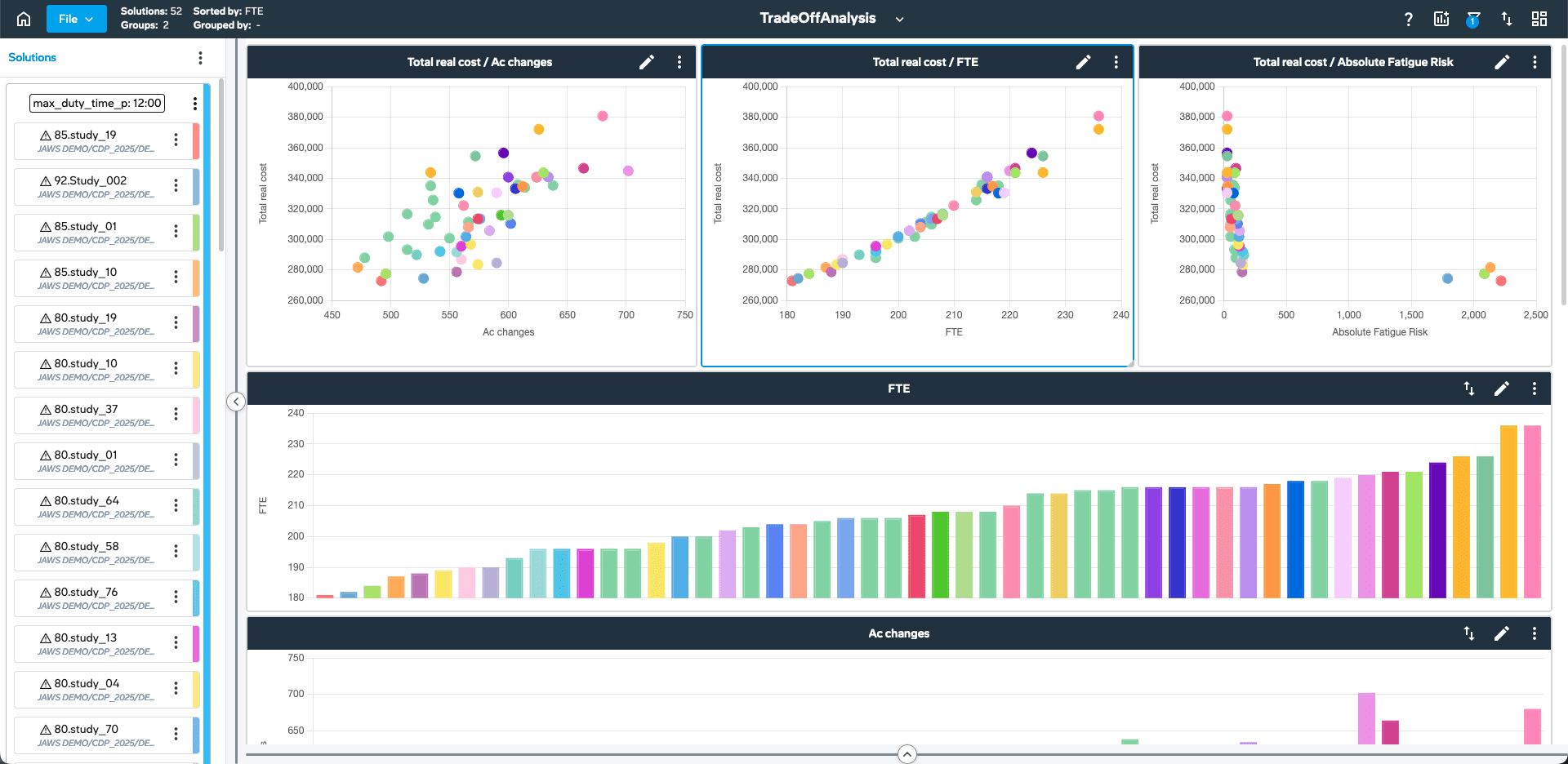
A purpose-built enterprise tool that lets planners configure, run, and compare multiple optimization scenarios in a single session — with visual KPI overlays, a surrogate model for instant feedback, and an exportable decision record that replaced the Excel-driven process entirely.
The Problem
Jeppesen's crew planning optimizer — a product used by airlines managing thousands of crew members — had a serious usability gap. The tool itself was powerful, but the workflow around it was broken.
Planners needed to evaluate different configurations before committing to a monthly schedule. That meant running the optimizer, waiting hours for results, exporting to Excel, manually comparing KPIs across tabs, then starting again. Each analysis cycle took 2–3 days. When deadlines compressed, planners defaulted to what worked last time rather than testing what might work better.
The real cost wasn't time. It was the decisions that never got explored.
Discovery
I ran structured interviews across six airlines (Air Astana, Transavia, Jazz, Mesa, and others) alongside NPS analysis of post-delivery feedback. The pattern was consistent: users didn't struggle with the optimizer's logic — they struggled with the workflow that surrounded it.
Key findings:
No way to compare multiple scenarios side by side within a single session
Results lived in Excel; context and reasoning stayed in people's heads
New planners took months to understand which parameters mattered and why
Management needed summary outputs, not raw optimizer data
I mapped the full current-state journey — from planning intent to published schedule — and ran an affinity exercise with the product team to align on where design could make the biggest difference. The answer was clear: the comparison and review phase.
Key Design Decisions
1. Same-session scenario comparison
Planners needed to run multiple optimizer jobs and compare them without leaving the tool. I designed a persistent comparison panel that let users pin up to four scenarios and overlay KPIs visually. This eliminated the Excel round-trip for most standard workflows.
2. Surrogate model as an instant feedback layer
Full optimizer runs took hours. I worked with the data science team to surface a lightweight surrogate model — an approximation trained on historical runs — that returned KPI estimates in seconds. This wasn't a substitute for the real optimizer, but it let planners test ideas before committing compute time.
3. Configuration templates
Power users had developed personal Excel sheets to track their preferred parameter sets. I replaced these with a native template system — saveable, shareable configurations that preserved institutional knowledge and reduced onboarding time for new planners.
4. Decision export
Managers didn't need the full optimizer output — they needed a clear record of what was compared, what was chosen, and why. I designed a structured export format that translated the session into a reviewable document without requiring planners to write a separate report.
Process
I worked as the sole UX designer embedded in an agile squad, collaborating directly with the product owner, two data scientists, and a front-end team of four. The project ran in two-week sprints over roughly 18 months.
Design was validated through four Customer Advisory Board sessions (CABs) with planners and ops managers from six airlines, plus moderated usability testing before each major release. The CAB format — which I co-designed and facilitated — became a model used across other Jeppesen product lines.
I also contributed to prioritisation, helping the PO sequence features based on validated user impact rather than internal assumptions. Several features that initially appeared on the roadmap were deprioritised or reshaped following CAB feedback.
Outcome
JAWS shipped and was adopted across multiple airlines. The comparison and template features saw the highest usage in analytics data, consistent with what we'd validated in research.
Estimated impact based on user feedback and pre/post workflow analysis:
~70% reduction in time spent on analysis workflows
Multi-day Excel processes replaced by structured same-session review
Template adoption reduced onboarding friction for new planners
CAB sessions generated validated roadmap input used in product planning through 2025
Reflection
The most important design decision in this project wasn't a UI pattern — it was agreeing on where the problem actually was. Early stakeholder assumptions pointed to the optimizer's configuration UI. Research pointed elsewhere: to the gap between running a job and making a decision.
Getting that reframe accepted early saved months of work on the wrong problem. It also taught me something I've held onto: in complex enterprise tools, the visible interface is often not where the real friction lives.
year
2024
timeframe
2022 – 2024
tools
Figma, Miro, JIRA, Python (surrogate modelling)
category
UI/UX